Picking the right cloud data platform is one of those decisions that keeps data teams up at night — and honestly, it should. Get it right, and your business moves faster. Get it wrong, and you’re stuck migrating six months later wondering what went wrong.
Snowflake, Databricks, Azure Synapse, and Amazon Redshift are all genuinely good options. The hard part isn’t finding something that works — it’s figuring out what actually fits your situation.
So let’s cut through the noise.
Note: This comparison focuses on four platforms. Google BigQuery is a strong alternative for GCP-native teams and deserves separate evaluation if that’s your cloud.
The Old Way Doesn’t Work Anymore
Remember when a data warehouse just… stored data? Those days are long gone.
Businesses today are asking a lot more from their data infrastructure — real-time dashboards, machine learning pipelines, cross-team collaboration, and the ability to scale without blowing up the budget. That’s what a Modern Data Platform is supposed to deliver.
Alongside that, a solid Data Operations Platform keeps all the moving pieces — ingestion, transformation, reporting — running without constant firefighting. When both are working well together, your data team stops being a bottleneck and starts being a multiplier.
Snowflake: For Teams That Just Want It to Work
I’ve seen a lot of teams waste months debating infrastructure when they should’ve just been building. Snowflake exists for exactly those situations.
It’s fully managed, meaning your engineers aren’t babysitting servers. The compute-storage separation means scaling up doesn’t require rearchitecting everything you only pay for what you use. That said, consumption-based pricing can be unpredictable; without proper auto-suspend policies and budget alerts, costs can balloon fast.
Snowflake makes sense if you’re focused on:
- Business intelligence and reporting
- SQL-based analytics
- Getting something production-ready without a six-person platform team
Snowflake has expanded into ML and Ai through Cortex Ai, Snowflake Intelligence, and Snowpark – covering many modern AI use cases natively. That said, for complex, custom ML pipeline or heavy unstructured data processing at scale, Databricks still hold the edge
Databricks: For Teams Serious About Data Engineering and AI
Databricks is what happens when data engineers and ML practitioners finally get a platform built with them in mind.
The lakehouse architecture — combining a data lake’s flexibility with warehouse-level performance — sounds like marketing speak until you actually use it. Built on Apache Spark, it handles the kind of workloads that would bring other platforms to their knees.
Where Databricks really earns its keep:
- Training and deploying machine learning models
- Real-time streaming and processing
- Working with both structured tables and messy, unstructured data
The catch is real though — there’s a learning curve. If your team is mostly analysts running SQL queries, Databricks can feel like overkill. But if you have data engineers and scientists who know what they’re doing, it unlocks capabilities nothing else really matches.
Azure Synapse: For Enterprises Already Living in Microsoft’s World
If your organization runs on Azure, uses Power BI for reporting, and has Azure ML in the roadmap — Synapse isn’t just a good choice, it’s probably the obvious one.
Microsoft built Synapse to bring data integration, warehousing, and big data analytics under one roof. The integrations with the rest of the Azure ecosystem are genuinely tight, which saves a lot of glue work that other platforms require.
It’s worth considering if:
- You’re a mid-to-large enterprise already committed to Azure
- Power BI is central to how stakeholders consume data
- Your team wants one environment instead of stitching together five tools
That said, Synapse isn’t the easiest platform to manage. Complex deployments require real expertise, and the performance tuning can get involved. It rewards teams that know Azure well — and frustrates those who don’t.
Amazon Redshift: Steady, Proven, and AWS-Native
Redshift doesn’t get a lot of hype these days, which is a little unfair. It’s been doing large-scale analytics reliably for over a decade, and for companies deeply embedded in AWS, it still makes a lot of sense.
The AWS ecosystem integration is seamless — S3, Glue, Lambda, SageMaker all play nicely together. For traditional data warehousing workloads at scale, Redshift holds up well.
It’s the right fit when:
- Your entire stack already lives on AWS
- Your use cases are primarily structured data and large-scale reporting
- You want a proven tool, not an experiment
Where it falls short is flexibility. Compared to newer platforms, Redshift can feel rigid, and getting the best performance out of provisioned Redshift often requires manual tuning, though Redshift Serverless reduces this overhead considerably.
How to Actually Choose
Skip the feature comparison spreadsheet for a moment. The more useful question is: what does your team actually need in the next 12 months?
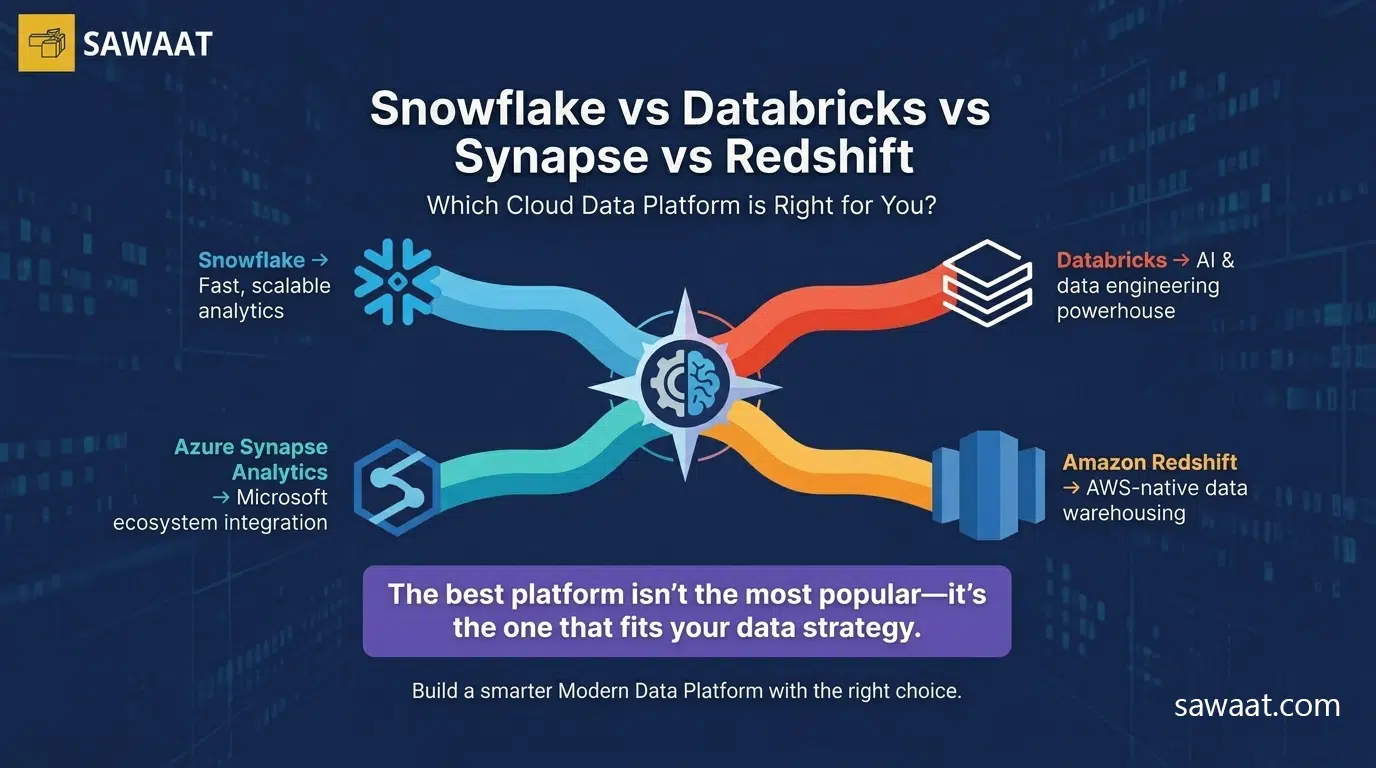
Go with Snowflake if fast, low-friction analytics is the goal and you don’t want to build a platform team just to keep the lights on.
Choose Databricks if AI and ML are central to your roadmap, or if you’re processing data at a scale where most tools start struggling.
Pick Synapse if you’re already in the Microsoft ecosystem and want everything under one roof without managing a bunch of separate integrations.
Go with Redshift if AWS is your home and you need a reliable, battle-tested warehouse that plays well with everything else in that world.
Why Most Mature Data Stacks Use More Than One Tool
Here’s something the platform vendors won’t tell you: the best data teams rarely rely on just one tool.
A practical Modern Data Platform often looks something like:
- A warehouse for structured analytics (Snowflake or Redshift)
- A processing engine for heavy lifting (Databricks)
- A BI layer for stakeholders (Power BI or Tableau)
- Transformation and orchestration tooling (dbt, Airflow)
This isn’t about buying more software — it’s about using the right tool for each job. When your Data Operations Platform is layered this way, you get flexibility without fragility.
Mistakes Worth Avoiding
A few patterns come up repeatedly in platform decisions that go sideways:
- Following trends instead of requirements — just because everyone’s talking about a tool doesn’t mean it’s right for your data
- Underestimating your team’s skillset — a powerful platform that nobody knows how to use is just expensive shelfware
- Ignoring total cost of ownership — licensing is just the beginning; compute costs, engineering time, and migration complexity all add up
- Expecting one platform to do everything — every tool has edges; knowing them matters
The goal isn’t perfect. It fits.
Final Thoughts
There’s no universally correct answer here, and anyone who tells you otherwise is probably trying to sell you something.
- Snowflake makes analytics accessible and fast
What’s true is that each platform has a real job it does well:
- Databricks handles the hard data and AI problems
- Synapse ties together the Microsoft ecosystem
- Redshift delivers dependable performance on AWS
The right choice is the one that fits where your team is today, where your data is headed, and how much complexity you’re willing to carry. Because at the end of the day, your data platform isn’t a trophy — it’s infrastructure. And good infrastructure is the kind you stop thinking about.